Nagios – NRPE
Nagios – NRPE
Nagios 守护进程在 NRPE(Nagios Remote Plugin Executor)中对远程机器运行检查。它允许您在其他机器上远程运行 Nagios 插件。您可以监控远程机器指标,例如磁盘使用情况、CPU 负载等。它还可以通过一些 Windows 代理插件检查远程 Windows 机器的指标。
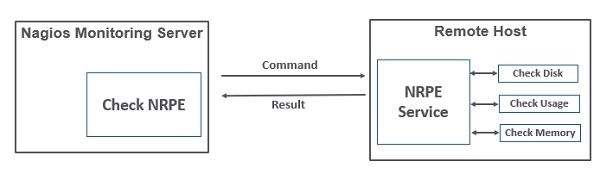
让我们看看如何在需要监控的客户端机器上逐步安装和配置 NRPE。
步骤 1 – 运行以下命令在要监控的远程 linux 机器上安装 NRPE。
sudo apt-get install nagios-nrpe-server nagios-plugins
第 2 步– 现在,在服务器目录中创建一个主机文件,并为主机放置所有必要的定义。
sudo gedit /usr/local/nagios/etc/servers/ubuntu_host.cfg
# Ubuntu Host configuration file

define host {
   use linux-server
   host_name ubuntu_host
   alias Ubuntu Host
   address 192.168.1.10
   register 1
}

define service {
   host_name ubuntu_host
   service_description PING
   check_command check_ping!100.0,20%!500.0,60%
   max_check_attempts 2
   check_interval 2
   retry_interval 2
   check_period 24x7
   check_freshness 1
   contact_groups admins
   notification_interval 2
   notification_period 24x7
   notifications_enabled 1
   register 1
}

define service {
   host_name ubuntu_host
   service_description Check Users
   check_command check_local_users!20!50
   max_check_attempts 2
   check_interval 2
   retry_interval 2
   check_period 24x7
   check_freshness 1
   contact_groups admins
   notification_interval 2
   notification_period 24x7
   notifications_enabled 1
   register 1
}

define service {
   host_name ubuntu_host
   service_description Local Disk
   check_command check_local_disk!20%!10%!/
   max_check_attempts 2
   check_interval 2
   retry_interval 2
   check_period 24x7
   check_freshness 1
   groups admins
   notification_interval 2
   notification_period 24x7
   notifications_enabled 1
   register 1
}

define service {
   host_name ubuntu_host
   service_description Check SSH
   check_command check_ssh
   max_check_attempts 2
   check_interval 2
   retry_interval 2
   check_period 24x7
   check_freshness 1
   contact_groups admins
   notification_interval 2
   notification_period 24x7
   notifications_enabled 1
   register 1
}

define service {
   host_name ubuntu_host
   service_description Total Process
   check_command check_local_procs!250!400!RSZDT
   max_check_attempts 2
   check_interval 2
   retry_interval 2
   check_period 24x7
   check_freshness 1
   contact_groups admins
   notification_interval 2
   notification_period 24x7
   notifications_enabled 1
   register 1
}
步骤 3 – 运行如下所示的命令以验证配置文件。
sudo /usr/local/nagios/bin/nagios -v /usr/local/nagios/etc/nagios.cfg
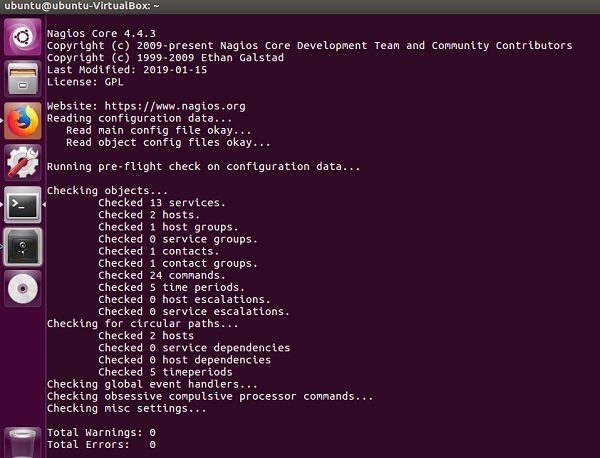
第 4 步– 如果没有错误,重新启动 NRPE、Apache 和 Nagios。
service nagios-nrpe-server restart
service apache2 restart
service nagios restart
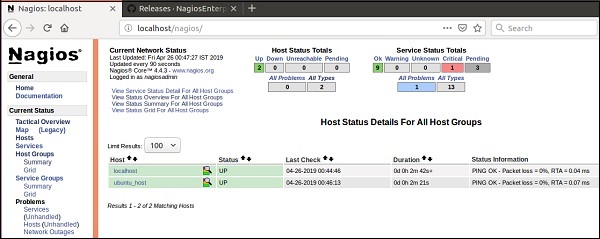
第 5 步– 打开浏览器并转到 Nagios Web 界面。可以看到需要监控的主机已经添加到 Nagios 核心服务中。同样,您可以添加更多要由 Nagios 监控的主机。