MFC – CArray
MFC – CArray
CArray是一个集合,最适合以随机或非顺序方式访问的数据。CArray 类支持类似于 C 数组的数组,但可以根据需要动态缩小和增长。
-
数组索引总是从位置 0 开始。
-
当您添加超过当前边界的元素时,您可以决定是修复上限还是启用数组扩展。
-
即使某些元素为空,内存也会连续分配到上限。
以下是对 CArray 对象的不同操作 –
创建 CArray 对象
要创建 CArray 值或对象的集合,您必须首先确定集合的值的类型。您可以使用现有的原始数据类型之一,例如 int、CString、double 等,如下所示;
CArray<CString, CString>strArray;
添加项目
要添加项目,您可以使用 CArray::Add() 函数。它在数组的末尾添加一个项目。在 OnInitDialog() 中,创建了 CArray 对象并添加了三个名称,如以下代码所示。
CArray<CString, CString>strArray;

//Add names to CArray
strArray.Add(L"Ali");
strArray.Add(L"Ahmed");
strArray.Add(L"Mark");
检索项目
要检索任何项目,您可以使用 CArray::GetAt() 函数。该函数将一个整数参数作为数组的索引。
第 1 步– 让我们看一个简单的例子,它将检索所有名称。
//Retrive names from CArray
   for (int i = 0; i < strArray.GetSize(); i++) {
      m_strText.Append(strArray.GetAt(i) + L"\n");
   }
第 2 步– 这是 CMFCCArrayDlg::OnInitDialog() 的完整实现
BOOL CMFCCArrayDlg::OnInitDialog() {
   CDialogEx::OnInitDialog();

   // Set the icon for this dialog. The framework does this automatically
   // when the application's main window is not a dialog
   SetIcon(m_hIcon, TRUE);               // Set big icon
   SetIcon(m_hIcon, FALSE);             // Set small icon

   // TODO: Add extra initialization here
   CArray<CString, CString>strArray;

   //Add names to CArray
   strArray.Add(L"Ali");
   strArray.Add(L"Ahmed");
   strArray.Add(L"Mark");

   //Retrive names from CArray
   for (int i = 0; i < strArray.GetSize(); i++) {
      m_strText.Append(strArray.GetAt(i) + L"\n");
   }

   UpdateData(FALSE);
   return TRUE; // return TRUE unless you set the focus to a control
}
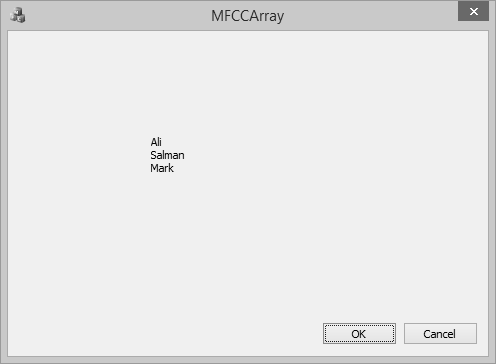
Step 3 – 编译并执行上述代码后,您将看到以下输出。
在中间添加项目
要在数组中间添加项目,您可以使用 CArray::.InsertAt() 函数。它需要两个参数——第一个是索引,第二个是值。
让我们在索引 1 处插入一个新项目,如以下代码所示。
BOOL CMFCCArrayDlg::OnInitDialog() {

   CDialogEx::OnInitDialog();

   // Set the icon for this dialog. The framework does this automatically
   // when the application's main window is not a dialog
   SetIcon(m_hIcon, TRUE);             // Set big icon
   SetIcon(m_hIcon, FALSE);            // Set small icon

   // TODO: Add extra initialization here
   CArray<CString, CString>strArray;
   //Add names to CArray
   strArray.Add(L"Ali");
   strArray.Add(L"Ahmed");
   strArray.Add(L"Mark");

   strArray.InsertAt(1, L"Allan");

   //Retrive names from CArray
   for (int i = 0; i < strArray.GetSize(); i++) {
      m_strText.Append(strArray.GetAt(i) + L"\n");
   }

   UpdateData(FALSE);
   return TRUE; // return TRUE unless you set the focus to a control
}
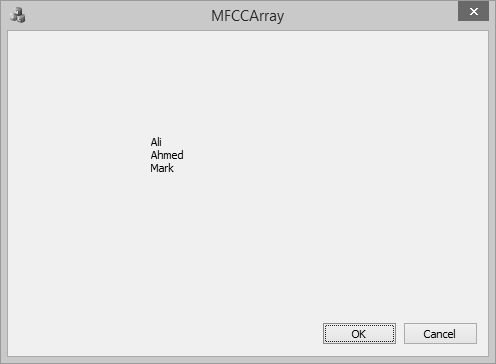
当上面的代码编译执行后,你会看到下面的输出。您现在可以看到名称 Allan dded 作为第二个索引。
更新项目值
要更新数组中间的项目,您可以使用 CArray::.SetAt() 函数。它需要两个参数——第一个是索引,第二个是值。
让我们更新数组中的第三个元素,如下面的代码所示。
BOOL CMFCCArrayDlg::OnInitDialog() {
   CDialogEx::OnInitDialog();

   // Set the icon for this dialog. The framework does this automatically
   // when the application's main window is not a dialog
   SetIcon(m_hIcon, TRUE);                 // Set big icon
   SetIcon(m_hIcon, FALSE);               // Set small icon

   // TODO: Add extra initialization here
   CArray<CString, CString>strArray;

   //Add names to CArray
   strArray.Add(L"Ali");
   strArray.Add(L"Ahmed");
   strArray.Add(L"Mark");

   strArray.InsertAt(1, L"Allan");

   strArray.SetAt(2, L"Salman");

   //Retrive names from CArray
   for (int i = 0; i < strArray.GetSize(); i++) {
      m_strText.Append(strArray.GetAt(i) + L"\n");
   }

   UpdateData(FALSE);
   return TRUE; // return TRUE unless you set the focus to a control
}
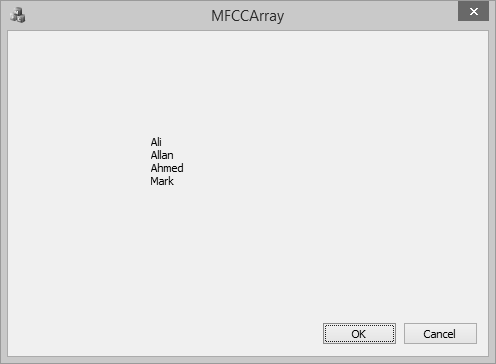
当上面的代码编译执行后,你会看到下面的输出。您现在可以看到第三个元素的值已更新。
复制数组
要将整个数组复制到另一个 CArray 对象中,可以使用 CArray::Copy() 函数。
Step1 – 让我们创建另一个数组并复制第一个数组中的所有元素,如下面的代码所示。
BOOL CMFCCArrayDlg::OnInitDialog() {
   CDialogEx::OnInitDialog();

   // Add "About..." menu item to system menu.

   // IDM_ABOUTBOX must be in the system command range.
   ASSERT((IDM_ABOUTBOX & 0xFFF0) == IDM_ABOUTBOX);
   ASSERT(IDM_ABOUTBOX < 0xF000);
   CMenu* pSysMenu = GetSystemMenu(FALSE);
   if (pSysMenu != NULL) {
      BOOL bNameValid;
      CString strAboutMenu;
      bNameValid = strAboutMenu.LoadString(IDS_ABOUTBOX);
      ASSERT(bNameValid);
      if (!strAboutMenu.IsEmpty()) {
         pSysMenu→AppendMenu(MF_SEPARATOR);
         pSysMenu→AppendMenu(MF_STRING, IDM_ABOUTBOX, strAboutMenu);
      }
   }
   // Set the icon for this dialog. The framework does this automatically
   // when the application's main window is not a dialog
   SetIcon(m_hIcon, TRUE);               // Set big icon
   SetIcon(m_hIcon, FALSE);              // Set small icon

   // TODO: Add extra initialization here
   CArray<CString, CString>strArray;
   //Add names to CArray
   strArray.Add(L"Ali");
   strArray.Add(L"Ahmed");
   strArray.Add(L"Mark");

   strArray.InsertAt(1, L"Allan");

   strArray.SetAt(2, L"Salman");

   CArray<CString, CString>strArray2;
   strArray2.Copy(strArray);
   //Retrive names from CArray
   for (int i = 0; i < strArray2.GetSize(); i++) {
      m_strText.Append(strArray2.GetAt(i) + L"\n");
   }

   UpdateData(FALSE);
   return TRUE; // return TRUE unless you set the focus to a control
}
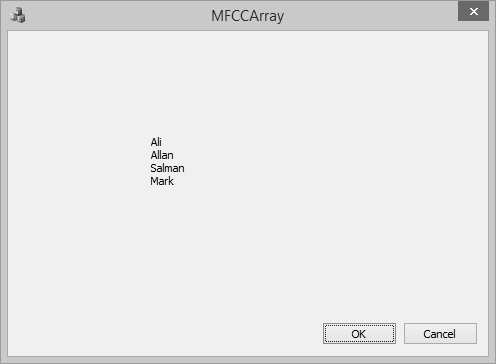
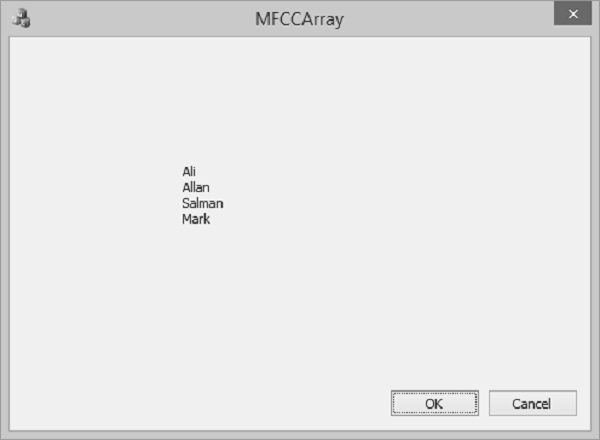
您现在可以看到我们已经从 2nd 数组和输出是一样的,因为我们使用了复制函数。
删除项目
要删除任何特定项目,您可以使用 CArray::RemoveAt() 函数。要从列表中删除所有元素,可以使用 CArray::RemoveAll() 函数。
让我们从数组中删除第二个元素。
BOOL CMFCCArrayDlg::OnInitDialog() {
   CDialogEx::OnInitDialog();

   SetIcon(m_hIcon, TRUE);             // Set big icon
   SetIcon(m_hIcon, FALSE);            // Set small icon

   // TODO: Add extra initialization here
   CArray<CString, CString>strArray;

   //Add names to CArray
   strArray.Add(L"Ali");
   strArray.Add(L"Ahmed");
   strArray.Add(L"Mark");

   strArray.InsertAt(1, L"Allan");

   strArray.SetAt(2, L"Salman");

   CArray<CString, CString>strArray2;
   strArray2.Copy(strArray);

   strArray2.RemoveAt(1);

   //Retrive names from CArray
   for (int i = 0; i < strArray2.GetSize(); i++) {
      m_strText.Append(strArray2.GetAt(i) + L"\n");
   }

   UpdateData(FALSE);
   return TRUE; // return TRUE unless you set the focus to a control
}
当上面的代码编译执行后,你会看到下面的输出。您现在可以看到名称 Allan 不再是数组的一部分。