Windows10 Dev – 应用程序通信
Windows10 Dev – 应用程序通信
应用程序间通信意味着您的应用程序可以与安装在同一设备上的另一个应用程序对话或通信。这不是通用 Windows 平台 (UWP) 应用程序中的新功能,在 Windows 8.1 中也可用。
在 Windows 10 中,引入了一些新的和改进的方法来轻松地在同一设备上的应用程序之间进行通信。两个应用程序之间的通信可以通过以下方式 –
- 一个应用程序使用一些数据启动另一个应用程序。
- 应用程序只是在不启动任何东西的情况下交换数据。
应用间通信的主要优点是您可以将应用程序分成更小的块,这些块可以轻松维护、更新和使用。
准备好您的应用程序
如果您按照下面给出的步骤操作,其他应用程序可以启动您的应用程序。
-
在应用程序包清单中添加协议声明。
-
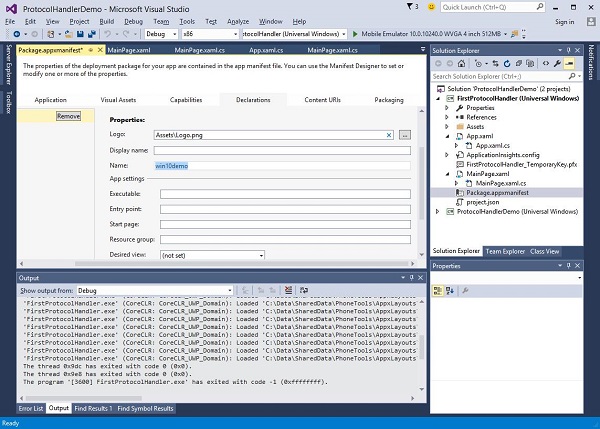
双击Package.appxmanifest文件,该文件在解决方案资源管理器中可用,如下所示。
-
转到声明选项卡并写下协议的名称,如下所示。
-
下一步是添加激活码,以便应用程序在被其他应用程序启动时可以做出适当的响应。
-
为了响应协议激活,我们需要覆盖激活类的OnActivated方法。因此,在App.xaml.cs文件中添加以下代码。
protected override void OnActivated(IActivatedEventArgs args) {

   ProtocolActivatedEventArgs protocolArgs = args as ProtocolActivatedEventArgs;

   if (args != null){

      Frame rootFrame = Window.Current.Content as Frame;

      // Do not repeat app initialization when the Window already has content,
      // just ensure that the window is active

      if (rootFrame == null){

         // Create a Frame to act as the navigation context and navigate to the first page
         rootFrame = new Frame();

         // Set the default language
         rootFrame.Language = Windows.Globalization.ApplicationLanguages.Languages[0];
         rootFrame.NavigationFailed += OnNavigationFailed;

         // Place the frame in the current Window
         Window.Current.Content = rootFrame;
      }

      if (rootFrame.Content == null){

         // When the navigation stack isn't restored, navigate to the
         // first page, configuring the new page by passing required
         // information as a navigation parameter

         rootFrame.Navigate(typeof(MainPage), null);
      }

      // Ensure the current window is active
      Window.Current.Activate();

   }
}
-
要启动应用程序,您可以简单地使用Launcher.LaunchUriAsync方法,该方法将使用此方法中指定的协议启动应用程序。
await Windows.System.Launcher.LaunchUriAsync(new Uri("win10demo:?SomeData=123"));
让我们通过一个简单的示例来理解这一点,其中我们有两个带有ProtocolHandlerDemo和FirstProtocolHandler 的UWP 应用程序。
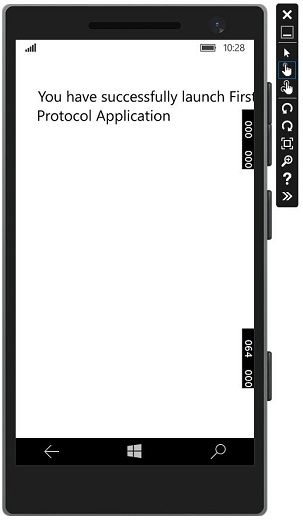
在此示例中,ProtocolHandlerDemo应用程序包含一个按钮,单击该按钮将打开FirstProtocolHandler应用程序。
下面给出了包含一个按钮的 ProtocolHandlerDemo 应用程序中的 XAML 代码。
<Page
   x:Class = "ProtocolHandlerDemo.MainPage"
   xmlns = "http://schemas.microsoft.com/winfx/2006/xaml/presentation"
   xmlns:x = "http://schemas.microsoft.com/winfx/2006/xaml"
   xmlns:local = "using:ProtocolHandlerDemo"
   xmlns:d = "http://schemas.microsoft.com/expression/blend/2008"
   xmlns:mc = "http://schemas.openxmlformats.org/markup-compatibility/2006"
   mc:Ignorable = "d">

   <Grid Background = "{ThemeResource ApplicationPageBackgroundThemeBrush}">
      <Button x:Name = "LaunchButton" Content = " Launch First Protocol App"
         FontSize = "24" HorizontalAlignment = "Center"
         Click = "LaunchButton_Click"/>
   </Grid>

</Page>
下面给出的是 C# 代码,其中实现了按钮单击事件。
using System;
using Windows.UI.Xaml;
using Windows.UI.Xaml.Controls;

// The Blank Page item template is documented at
   http://go.microsoft.com/fwlink/?LinkId=402352&clcid=0x409

namespace ProtocolHandlerDemo {

   /// <summary>
      /// An empty page that can be used on its own or navigated to within a Frame.
   /// </summary>

   public sealed partial class MainPage : Page {

      public MainPage(){
         this.InitializeComponent();
      }

      private async void LaunchButton_Click(object sender, RoutedEventArgs e) {
         await Windows.System.Launcher.LaunchUriAsync(new
            Uri("win10demo:?SomeData=123"));
      }

   }
}
现在让我们看看FirstProtocolHandler应用程序表。下面给出了 XAML 代码,其中使用一些属性创建了一个文本块。
<Page
   x:Class = "FirstProtocolHandler.MainPage"
   xmlns = "http://schemas.microsoft.com/winfx/2006/xaml/presentation"
   xmlns:x = "http://schemas.microsoft.com/winfx/2006/xaml"
   xmlns:local = "using:FirstProtocolHandler"
   xmlns:d = "http://schemas.microsoft.com/expression/blend/2008"
   xmlns:mc = "http://schemas.openxmlformats.org/markup-compatibility/2006"
   mc:Ignorable = "d">

   <Grid Background = "{ThemeResource ApplicationPageBackgroundThemeBrush}">
      <TextBlock Text = "You have successfully launch First Protocol Application"
         TextWrapping = "Wrap" Style = "{StaticResource SubtitleTextBlockStyle}"
         Margin = "30,39,0,0" VerticalAlignment = "Top" HorizontalAlignment = "Left"
         Height = "100" Width = "325"/>
   </Grid>

</Page>
覆盖OnActicated的App.xaml.cs文件的 C# 实现如下所示。在App.xaml.cs文件的App 类中添加以下代码。
protected override void OnActivated(IActivatedEventArgs args) {
   ProtocolActivatedEventArgs protocolArgs = args as ProtocolActivatedEventArgs;

   if (args != null) {
      Frame rootFrame = Window.Current.Content as Frame;

      // Do not repeat app initialization when the Window already has content,
      // just ensure that the window is active

      if (rootFrame == null) {

         // Create a Frame to act as the navigation context and navigate to
            the first page
         rootFrame = new Frame();

         // Set the default language
         rootFrame.Language = Windows.Globalization.ApplicationLanguages.Languages[0];
         rootFrame.NavigationFailed += OnNavigationFailed;

         // Place the frame in the current Window
         Window.Current.Content = rootFrame;
      }

      if (rootFrame.Content == null) {

         // When the navigation stack isn't restored navigate to the
         // first page, configuring the new page by passing required
         // information as a navigation parameter

         rootFrame.Navigate(typeof(MainPage), null);
      }

      // Ensure the current window is active
      Window.Current.Activate();
   }
}
当您在模拟器上编译并执行ProtocolHandlerDemo应用程序时,您将看到以下窗口。
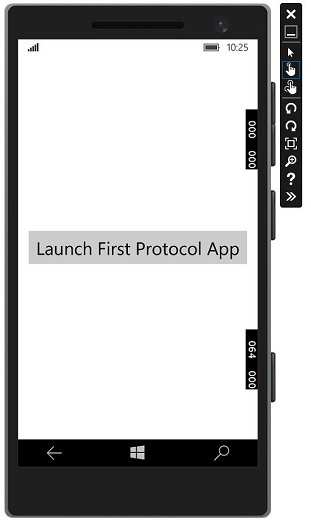
现在,当您单击该按钮时,它将打开FirstProtocolHandler应用程序,如下所示。