ASP.NET Core – 异常
ASP.NET Core – 异常
在本章中,我们将讨论异常和错误处理。当您的 ASP.NET Core 应用程序中出现错误时,您可以通过多种方式处理它们。让我们看看通过诊断包可用的附加中间件。这块中间件将帮助我们处理错误。
为了模拟一个错误,让我们去app.Run看看如果我们每次碰到这个中间件时都抛出一个异常,应用程序会如何表现。
using Microsoft.AspNet.Builder;
using Microsoft.AspNet.Hosting;
using Microsoft.AspNet.Http;

using Microsoft.Extensions.DependencyInjection;
using Microsoft.Extensions.Configuration;

namespace FirstAppDemo {
   public class Startup {
      public Startup() {
         var builder = new ConfigurationBuilder()
            .AddJsonFile("AppSettings.json");
         Configuration = builder.Build();
      }
      public IConfiguration Configuration { get; set; }

      // This method gets called by the runtime.
      // Use this method to add services to the container.
      // For more information on how to configure your application,
      // visit http://go.microsoft.com/fwlink/?LinkID=398940
      public void ConfigureServices(IServiceCollection services) {
      }

      // This method gets called by the runtime.
      // Use this method to configure the HTTP request pipeline.
      public void Configure(IApplicationBuilder app) {
         app.UseIISPlatformHandler();
         app.UseRuntimeInfoPage();

         app.Run(async (context) => {
            throw new System.Exception("Throw Exception");
            var msg = Configuration["message"];
            await context.Response.WriteAsync(msg);
         });
      }

      // Entry point for the application.
      public static void Main(string[] args) => WebApplication.Run<Startup>(args);
   }
}
它只会抛出一个带有非常通用消息的异常。保存Startup.cs页面并运行您的应用程序。
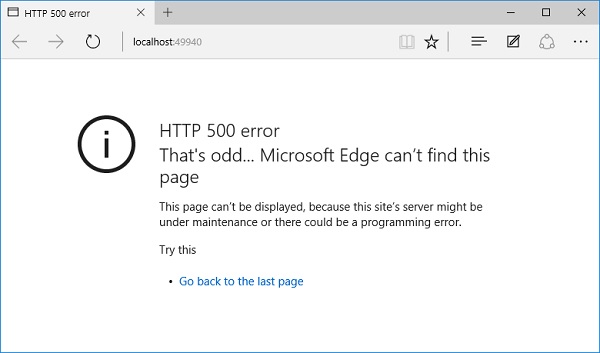
您将看到我们未能加载此资源。有一个 HTTP 500 错误,一个内部服务器错误,这不是很有帮助。获得一些异常信息可能会很好。
让我们添加另一个中间件,即UseDeveloperExceptionPage。
// This method gets called by the runtime.
// Use this method to configure the HTTP request pipeline.
public void Configure(IApplicationBuilder app) {
   app.UseIISPlatformHandler();
   app.UseDeveloperExceptionPage();
   app.UseRuntimeInfoPage();

   app.Run(async (context) => {
      throw new System.Exception("Throw Exception");
      var msg = Configuration["message"];
      await context.Response.WriteAsync(msg);
   });
}
-
这个中间件与其他中间件有点不同,其他中间件通常查看传入的请求并对该请求做出一些决定。
-
UseDeveloperExceptionPage 不太关心传入的请求,因为它会处理管道中稍后发生的事情。
-
它只会调用下一个中间件,然后它会等待查看管道中稍后是否有任何东西生成异常,如果有异常,这块中间件会给你一个错误页面,其中包含一些有关该异常的其他信息。
现在让我们再次运行应用程序。它将产生一个输出,如下面的屏幕截图所示。
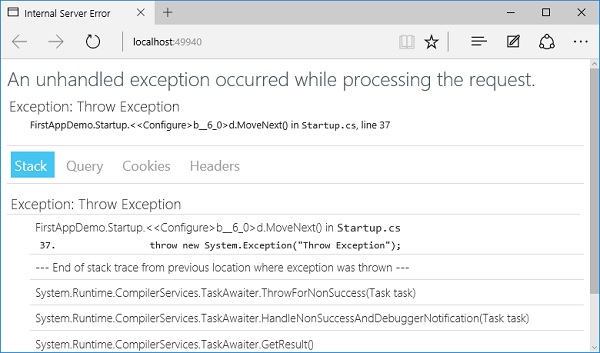
现在,您将看到一些信息,如果开发中出现错误,您会期望这些信息。您还将获得堆栈跟踪,您可以看到在 Startup.cs 的第 37 行抛出了一个未处理的异常。
您还可以查看原始异常详细信息,所有这些信息对开发人员都非常有用。实际上,我们可能只想在开发人员运行应用程序时显示此信息。
