ASP.NET Core – Razor 编辑表单
ASP.NET Core – Razor 编辑表单
在本章中,我们将继续讨论标签助手。我们还将在我们的应用程序中添加一个新功能,并使其能够编辑现有员工的详细信息。我们将首先在每个员工的一侧添加一个链接,该链接将转到 HomeController 上的 Edit 操作。
@model HomePageViewModel
@{
   ViewBag.Title = "Home";
}
<h1>Welcome!</h1>

<table>
   @foreach (var employee in Model.Employees) {
      <tr>
         <td>@employee.Name</td>

         <td>
            <a asp-controller = "Home" asp-action = "Details"
               asp-routeid = "@employee.Id">Details</a>

            <a asp-controller = "Home" asp-action = "Edit"
               asp-routeid = "@employee.Id">Edit</a>

         </td>
      </tr>
   }
</table>
我们还没有 Edit 操作,但我们需要一个可以编辑的员工 ID。因此,让我们首先通过右键单击Views →Home文件夹并选择Add → New Items来创建一个新视图。
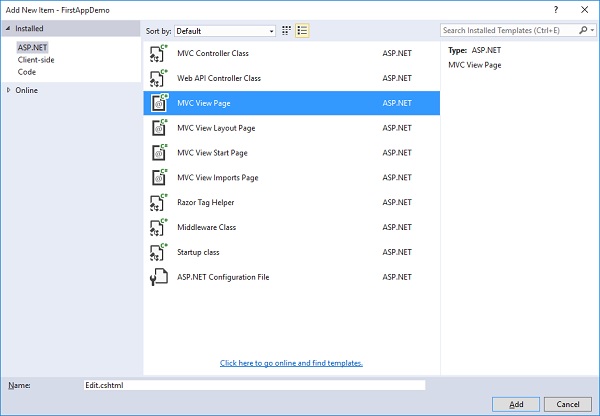
在中间窗格中,选择 MVC View Page;调用页面 Edit.cshtml。现在,单击“添加”按钮。
在Edit.cshtml文件中添加以下代码。
@model Employee
@{
   ViewBag.Title = $"Edit {Model.Name}";
}
<h1>Edit @Model.Name</h1>

<form asp-action="Edit" method="post">
   <div>
      <label asp-for = "Name"></label>
      <input asp-for = "Name" />
      <span asp-validation-for = "Name"></span>
   </div>

   <div>
      <input type = "submit" value = "Save" />
   </div>
</form>
对于这个页面的标题,我们可以说我们要编辑然后提供员工姓名。
-
Edit前面的美元符号将允许运行时将 Model.Name 替换为该属性中的值,例如员工姓名。
-
在表单标签内,我们可以使用标签助手,如 asp-action 和 asp-controller。这样当用户提交此表单时,它会直接转到特定的控制器操作。
-
在这种情况下,我们想转到同一控制器上的 Edit 操作,并且我们想明确说明对于此表单上的方法,它应该使用 HttpPost。
-
表单的默认方法是 GET,我们不想使用 GET 操作编辑员工。
-
在标签标签中,我们使用了 asp-for 标签助手,它表示这是模型的 Name 属性的标签。这个标签助手可以设置 Html.For 属性以获得正确的值并设置此标签的内部文本,以便它实际显示我们想要的内容,例如员工姓名。
让我们转到 HomeController 类并添加Edit操作,该操作返回视图,该视图为用户提供编辑员工的表单,然后我们将需要第二个 Edit 操作来响应 HttpPost,如下所示。
[HttpGet]
public IActionResult Edit(int id) {
   var context = new FirstAppDemoDbContext();
   SQLEmployeeData sqlData = new SQLEmployeeData(context);
   var model = sqlData.Get(id);

   if (model == null) {
      return RedirectToAction("Index");
   }
   return View(model);
}
首先,我们需要一个将响应 GET 请求的编辑操作。它将需要一个员工 ID。此处的代码将类似于我们在 Details 操作中的代码。我们将首先提取用户要编辑的员工的数据。我们还需要确保员工确实存在。如果它不存在,我们会将用户重定向回索引视图。但是当员工存在时,我们将呈现编辑视图。
我们还需要响应表单将发送的 HttpPost。
让我们在 HomeController.cs 文件中添加一个新类,如以下程序所示。
public class EmployeeEditViewModel {
   [Required, MaxLength(80)]
   public string Name { get; set; }
}
在将响应 HttpPost 的编辑操作中,将采用 EmployeeEditViewModel,而不是员工本身,因为我们只想捕获 Edit.cshtml 文件中表单中的项目。
下面是 Edit 动作的实现。
[HttpPost]
public IActionResult Edit(int id, EmployeeEditViewModel input) {
   var context = new FirstAppDemoDbContext();
   SQLEmployeeData sqlData = new SQLEmployeeData(context);
   var employee = sqlData.Get(id);

   if (employee != null && ModelState.IsValid) {
      employee.Name = input.Name;
      context.SaveChanges();
      return RedirectToAction("Details", new { id = employee.Id });
   }
   return View(employee);
}
根据我们的路由规则,编辑表单应始终从在 URL 中具有 ID 的 URL 传递,例如/home/edit/1。
-
表单总是会回发到同一个 URL,/home/edit/1。
-
MVC 框架将能够从 URL 中提取该 ID 并将其作为参数传递。
-
在我们在数据库中执行更新操作之前,我们总是需要检查 ModelState 是否有效,并确保该员工在数据库中并且它不为空。
-
如果这些都不是真的,我们将返回一个视图并允许用户重试。虽然在并发用户的实际应用中,如果员工为空,可能是因为员工详细信息被某人删除了。
-
如果该员工不存在,则告诉用户该员工不存在。
-
否则,请检查 ModelState。如果 ModelState 无效,则返回一个视图。这允许修复编辑并使 ModelState 有效。
-
将输入视图模型中的姓名复制到从数据库中检索到的员工并保存更改。SaveChagnes() 方法会将所有这些更改刷新到数据库中。
以下是 HomeController 的完整实现。
using Microsoft.AspNet.Mvc;

using FirstAppDemo.ViewModels;
using FirstAppDemo.Services;
using FirstAppDemo.Entities;
using FirstAppDemo.Models;

using System.Collections.Generic;
using System.Linq;
using System.ComponentModel.DataAnnotations;

namespace FirstAppDemo.Controllers {
   public class HomeController : Controller {
      public ViewResult Index() {
         var model = new HomePageViewModel();
         using (var context = new FirstAppDemoDbContext()) {
            SQLEmployeeData sqlData = new SQLEmployeeData(context);
            model.Employees = sqlData.GetAll();
         }
         return View(model);
      }
      public IActionResult Details(int id) {
         var context = new FirstAppDemoDbContext();
         SQLEmployeeData sqlData = new SQLEmployeeData(context);
         var model = sqlData.Get(id)

         if (model == null) {
            return RedirectToAction("Index");
         }
         return View(model);
      }
      [HttpGet]
      public IActionResult Edit(int id) {
         var context = new FirstAppDemoDbContext();
         SQLEmployeeData sqlData = new SQLEmployeeData(context);
         var model = sqlData.Get(id);

         if (model == null) {
            return RedirectToAction("Index");
         }
         return View(model);
      }
      [HttpPost]
      public IActionResult Edit(int id, EmployeeEditViewModel input) {
         var context = new FirstAppDemoDbContext();
         SQLEmployeeData sqlData = new SQLEmployeeData(context);
         var employee = sqlData.Get(id);

         if (employee != null && ModelState.IsValid) {
            employee.Name = input.Name;
            context.SaveChanges();
            return RedirectToAction("Details", new { id = employee.Id });
         }
         return View(employee);
      }
   }
   public class SQLEmployeeData {
      private FirstAppDemoDbContext _context { get; set; }
      public SQLEmployeeData(FirstAppDemoDbContext context) {
         _context = context;
      }
      public void Add(Employee emp) {
         _context.Add(emp);
         _context.SaveChanges();
      }
      public Employee Get(int ID) {
         return _context.Employees.FirstOrDefault(e => e.Id == ID);
      }
      public IEnumerable<Employee> GetAll() {
         return _context.Employees.ToList<Employee>();
      }
   }
   public class HomePageViewModel {
      public IEnumerable<Employee> Employees { get; set; }
   }
   public class EmployeeEditViewModel {
      [Required, MaxLength(80)]
      public string Name { get; set; }
   }
}
让我们编译程序并运行应用程序。
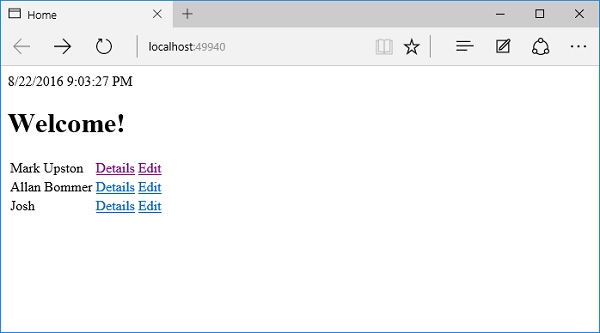
我们现在有一个可用的编辑链接;让我们通过单击“编辑”链接来编辑 Josh 的详细信息。
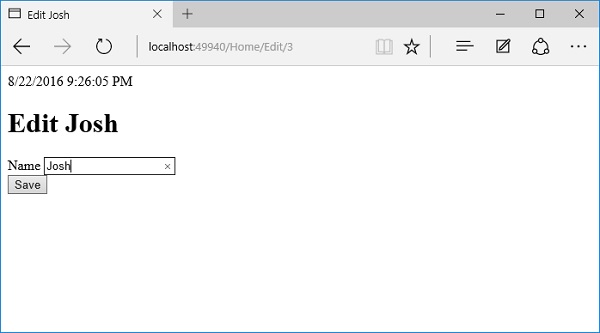
让我们将名称更改为 Josh Groban。
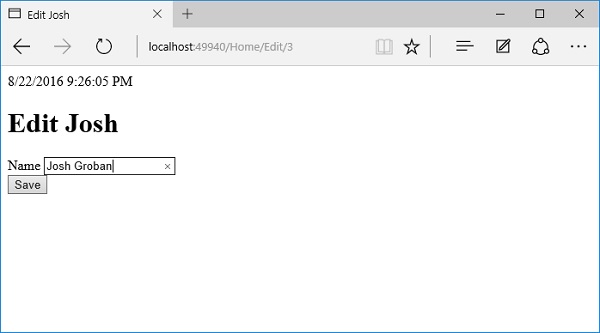
单击保存按钮。
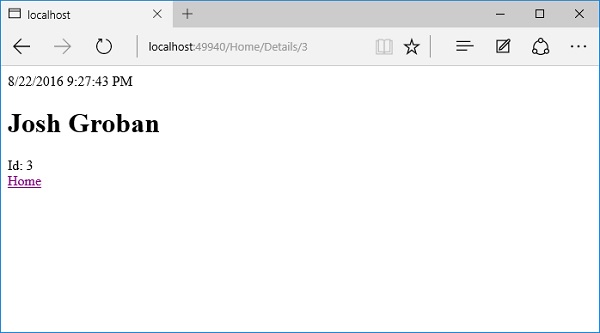
您可以看到名称已更改为 Josh Groban,如上面的屏幕截图所示。现在让我们点击主页链接。
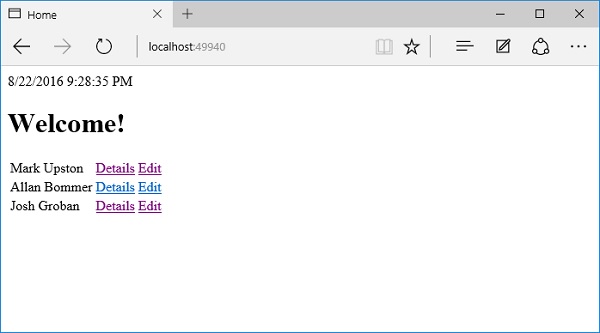
在主页上,您现在将看到更新后的名称。
