异步操作
异步操作
在本章中,我们将学习如何使用 Espresso 空闲资源测试异步操作。
现代应用程序的挑战之一是提供流畅的用户体验。提供流畅的用户体验需要在后台进行大量工作,以确保应用程序过程不会超过几毫秒。后台任务范围从简单的任务到从远程 API/数据库获取数据的昂贵且复杂的任务。为了应对过去的挑战,开发人员习惯于在后台线程中编写昂贵且长时间运行的任务,并在后台线程完成后与主UIThread同步。
如果开发多线程应用程序很复杂,那么为其编写测试用例就更加复杂。例如,我们不应该在从数据库加载必要的数据之前测试AdapterView。如果获取数据是在单独的线程中完成的,则测试需要等到线程完成。因此,测试环境应该在后台线程和 UI 线程之间同步。Espresso 为测试多线程应用程序提供了极好的支持。应用程序以下列方式使用线程,espresso 支持所有场景。
用户界面线程
android SDK 内部使用它来为复杂的 UI 元素提供流畅的用户体验。Espresso 透明地支持这种场景,不需要任何配置和特殊编码。
异步任务
现代编程语言支持异步编程来进行轻量级线程处理,而无需线程编程的复杂性。espresso 框架也透明地支持异步任务。
用户线程
开发人员可能会启动一个新线程来从数据库中获取复杂或大的数据。为了支持这个场景,espresso 提供了空闲资源的概念。
让我们在本章中学习空闲资源的概念以及如何使用它。
概述
空闲资源的概念非常简单直观。基本思想是每当在单独的线程中启动长时间运行的进程时创建一个变量(布尔值),以识别该进程是否正在运行并将其注册到测试环境中。在测试过程中,测试运行器会检查注册的变量,如果找到的话,然后找到它的运行状态。如果运行状态为真,则测试运行器将等待状态变为假。
Espresso 提供了一个接口 IdlingResources 用于维护运行状态。实现的主要方法是isIdleNow()。如果 isIdleNow() 返回 true,espresso 将继续测试过程,否则等待 isIdleNow() 返回 false。我们需要实现 IdlingResources 并使用派生类。Espresso 还提供了一些内置的 IdlingResources 实现来减轻我们的工作量。它们如下,
计算空闲资源
这维护了运行任务的内部计数器。它公开了increment()和decrement()方法。increment()向计数器加一,decrement()从计数器中删除一。isIdleNow()仅在没有任务处于活动状态时返回 true。
URI空闲资源
这与CoinintIdlingResource类似,不同之处在于计数器需要在较长时间内为零以获取网络延迟。
空闲线程池执行器
这是ThreadPoolExecutor的自定义实现,用于维护当前线程池中活动运行任务的数量。
IdlingScheduledThreadPoolExecutor
这类似于IdlingThreadPoolExecutor,但它也调度任务和 ScheduledThreadPoolExecutor 的自定义实现。
如果应用程序中使用了上述IdlingResources 的任何一种实现或自定义的实现,我们需要在使用IdlingRegistry类测试应用程序之前将其注册到测试环境,如下所示,
IdlingRegistry.getInstance().register(MyIdlingResource.getIdlingResource());
此外,测试完成后可以将其删除,如下所示 –
IdlingRegistry.getInstance().unregister(MyIdlingResource.getIdlingResource());
Espresso 在一个单独的包中提供此功能,该包需要在 app.gradle 中配置如下。
dependencies {
   implementation 'androidx.test.espresso:espresso-idling-resource:3.1.1'
   androidTestImplementation "androidx.test.espresso.idling:idlingconcurrent:3.1.1"
}
示例应用程序
让我们创建一个简单的应用程序,通过从单独线程中的 Web 服务获取水果来列出水果,然后使用空闲资源概念对其进行测试。
-
启动安卓工作室。
-
如前所述创建新项目并将其命名为 MyIdlingFruitApp
-
使用Refactor → Migrate to AndroidX选项菜单将应用程序迁移到 AndroidX 框架。
-
在app/build.gradle 中添加 espresso 空闲资源库(并同步它),如下所示,
dependencies {
   implementation 'androidx.test.espresso:espresso-idling-resource:3.1.1'
   androidTestImplementation "androidx.test.espresso.idling:idlingconcurrent:3.1.1"
}
-
去掉主activity中的默认设计,添加ListView。activity_main.xml的内容如下,
<?xml version = "1.0" encoding = "utf-8"?>
<RelativeLayout xmlns:android = "http://schemas.android.com/apk/res/android"
   xmlns:app = "http://schemas.android.com/apk/res-auto"
   xmlns:tools = "http://schemas.android.com/tools"
   android:layout_width = "match_parent"
   android:layout_height = "match_parent"
   tools:context = ".MainActivity">
   <ListView
      android:id = "@+id/listView"
      android:layout_width = "wrap_content"
      android:layout_height = "wrap_content" />
</RelativeLayout>
-
添加新的布局资源item.xml以指定列表视图的项目模板。item.xml的内容如下,
<?xml version = "1.0" encoding = "utf-8"?>
<TextView xmlns:android = "http://schemas.android.com/apk/res/android"
   android:id = "@+id/name"
   android:layout_width = "fill_parent"
   android:layout_height = "fill_parent"
   android:padding = "8dp"
/>
-
创建一个新类 – MyIdlingResource。MyIdlingResource用于将我们的 IdlingResource 保存在一个地方,并在必要时获取它。我们将在我们的示例中使用CountingIdlingResource。
package com.tutorialspoint.espressosamples.myidlingfruitapp;
import androidx.test.espresso.IdlingResource;
import androidx.test.espresso.idling.CountingIdlingResource;

public class MyIdlingResource {
   private static CountingIdlingResource mCountingIdlingResource =
      new CountingIdlingResource("my_idling_resource");
   public static void increment() {
      mCountingIdlingResource.increment();
   }
   public static void decrement() {
      mCountingIdlingResource.decrement();
   }
   public static IdlingResource getIdlingResource() {
      return mCountingIdlingResource;
   }
}
-
在MainActivity类中声明一个全局变量,类型为CountingIdlingResource 的mIdlingResource,如下所示,
@Nullable
private CountingIdlingResource mIdlingResource = null;
-
编写一个私有方法来从网络获取水果列表,如下所示,
private ArrayList<String> getFruitList(String data) {
   ArrayList<String> fruits = new ArrayList<String>();
   try {
      // Get url from async task and set it into a local variable
      URL url = new URL(data);
      Log.e("URL", url.toString());

      // Create new HTTP connection
      HttpURLConnection conn = (HttpURLConnection) url.openConnection();

      // Set HTTP connection method as "Get"
      conn.setRequestMethod("GET");

      // Do a http request and get the response code
      int responseCode = conn.getResponseCode();

      // check the response code and if success, get response content
      if (responseCode == HttpURLConnection.HTTP_OK) {
         BufferedReader in = new BufferedReader(new InputStreamReader(conn.getInputStream()));
         String line;
         StringBuffer response = new StringBuffer();
         while ((line = in.readLine()) != null) {
            response.append(line);
         }
         in.close();
         JSONArray jsonArray = new JSONArray(response.toString());
         Log.e("HTTPResponse", response.toString());
         for(int i = 0; i < jsonArray.length(); i++) {
            JSONObject jsonObject = jsonArray.getJSONObject(i);
            String name = String.valueOf(jsonObject.getString("name"));
            fruits.add(name);
         }
      } else {
         throw new IOException("Unable to fetch data from url");
      }
      conn.disconnect();
   } catch (IOException | JSONException e) {
      e.printStackTrace();
   }
   return fruits;
}
-
在onCreate()方法中创建一个新任务,使用我们的getFruitList方法从 Web 获取数据,然后创建一个新适配器并将其设置为列表视图。此外,一旦我们的工作在线程中完成,就减少空闲资源。代码如下,
// Get data
class FruitTask implements Runnable {
   ListView listView;
   CountingIdlingResource idlingResource;
   FruitTask(CountingIdlingResource idlingRes, ListView listView) {
      this.listView = listView;
      this.idlingResource = idlingRes;
   }
   public void run() {
      //code to do the HTTP request
      final ArrayList<String> fruitList = getFruitList("http://<your domain or IP>/fruits.json");
      try {
         synchronized (this){
            runOnUiThread(new Runnable() {
               @Override
               public void run() {
                  // Create adapter and set it to list view
                  final ArrayAdapter adapter = new
                     ArrayAdapter(MainActivity.this, R.layout.item, fruitList);
                  ListView listView = (ListView)findViewById(R.id.listView);
                  listView.setAdapter(adapter);
               }
            });
         }
      } catch (Exception e) {
         e.printStackTrace();
      }
      if (!MyIdlingResource.getIdlingResource().isIdleNow()) {
         MyIdlingResource.decrement(); // Set app as idle.
      }
   }
}
在这里,fruit url 被视为http://<your domain 或 IP/fruits.json,它的格式为 JSON。内容如下,
[
   {
      "name":"Apple"
   },
   {
      "name":"Banana"
   },
   {
      "name":"Cherry"
   },
   {
      "name":"Dates"
   },
   {
      "name":"Elderberry"
   },
   {
      "name":"Fig"
   },
   {
      "name":"Grapes"
   },
   {
      "name":"Grapefruit"
   },
   {
      "name":"Guava"
   },
   {
      "name":"Jack fruit"
   },
   {
      "name":"Lemon"
   },
   {
      "name":"Mango"
   },
   {
      "name":"Orange"
   },
   {
      "name":"Papaya"
   },
   {
      "name":"Pears"
   },
   {
      "name":"Peaches"
   },
   {
      "name":"Pineapple"
   },
   {
      "name":"Plums"
   },
   {
      "name":"Raspberry"
   },
   {
      "name":"Strawberry"
   },
   {
      "name":"Watermelon"
   }
]
注意– 将文件放在本地 Web 服务器中并使用它。
-
现在,找到视图,通过传递FruitTask创建一个新线程,增加空闲资源并最终启动任务。
// Find list view
ListView listView = (ListView) findViewById(R.id.listView);
Thread fruitTask = new Thread(new FruitTask(this.mIdlingResource, listView));
MyIdlingResource.increment();
fruitTask.start();
-
MainActivity的完整代码如下,
package com.tutorialspoint.espressosamples.myidlingfruitapp;

import androidx.annotation.NonNull;
import androidx.annotation.Nullable;
import androidx.annotation.VisibleForTesting;
import androidx.appcompat.app.AppCompatActivity;
import androidx.test.espresso.idling.CountingIdlingResource;

import android.os.Bundle;
import android.util.Log;
import android.widget.ArrayAdapter;
import android.widget.ListView;

import org.json.JSONArray;
import org.json.JSONException;
import org.json.JSONObject;

import java.io.BufferedReader;
import java.io.IOException;
import java.io.InputStreamReader;
import java.net.HttpURLConnection;
import java.net.URL;
import java.util.ArrayList;

public class MainActivity extends AppCompatActivity {
   @Nullable
   private CountingIdlingResource mIdlingResource = null;
   @Override
   protected void onCreate(Bundle savedInstanceState) {
      super.onCreate(savedInstanceState);
      setContentView(R.layout.activity_main);

      // Get data
      class FruitTask implements Runnable {
         ListView listView;
         CountingIdlingResource idlingResource;
         FruitTask(CountingIdlingResource idlingRes, ListView listView) {
            this.listView = listView;
            this.idlingResource = idlingRes;
         }
         public void run() {
            //code to do the HTTP request
            final ArrayList<String> fruitList = getFruitList(
               "http://<yourdomain or IP>/fruits.json");
            try {
               synchronized (this){
                  runOnUiThread(new Runnable() {
                     @Override
                     public void run() {
                        // Create adapter and set it to list view
                        final ArrayAdapter adapter = new ArrayAdapter(
                           MainActivity.this, R.layout.item, fruitList);
                        ListView listView = (ListView) findViewById(R.id.listView);
                        listView.setAdapter(adapter);
                     }
                  });
               }
            } catch (Exception e) {
               e.printStackTrace();
            }
            if (!MyIdlingResource.getIdlingResource().isIdleNow()) {
               MyIdlingResource.decrement(); // Set app as idle.
            }
         }
      }
      // Find list view
      ListView listView = (ListView) findViewById(R.id.listView);
      Thread fruitTask = new Thread(new FruitTask(this.mIdlingResource, listView));
      MyIdlingResource.increment();
      fruitTask.start();
   }
   private ArrayList<String> getFruitList(String data) {
      ArrayList<String> fruits = new ArrayList<String>();
      try {
         // Get url from async task and set it into a local variable
         URL url = new URL(data);
         Log.e("URL", url.toString());

         // Create new HTTP connection
         HttpURLConnection conn = (HttpURLConnection) url.openConnection();

         // Set HTTP connection method as "Get"
         conn.setRequestMethod("GET");

         // Do a http request and get the response code
         int responseCode = conn.getResponseCode();

         // check the response code and if success, get response content
         if (responseCode == HttpURLConnection.HTTP_OK) {
            BufferedReader in = new BufferedReader(new InputStreamReader(conn.getInputStream()));
            String line;
            StringBuffer response = new StringBuffer();
            while ((line = in.readLine()) != null) {
               response.append(line);
            }
            in.close();
            JSONArray jsonArray = new JSONArray(response.toString());
            Log.e("HTTPResponse", response.toString());

            for(int i = 0; i < jsonArray.length(); i++) {
               JSONObject jsonObject = jsonArray.getJSONObject(i);
               String name = String.valueOf(jsonObject.getString("name"));
               fruits.add(name);
            }
         } else {
            throw new IOException("Unable to fetch data from url");
         }
         conn.disconnect();
      } catch (IOException | JSONException e) {
         e.printStackTrace();
      }
      return fruits;
   }
}
-
现在,在应用程序清单文件AndroidManifest.xml 中添加以下配置
<uses-permission android:name = "android.permission.INTERNET" />
-
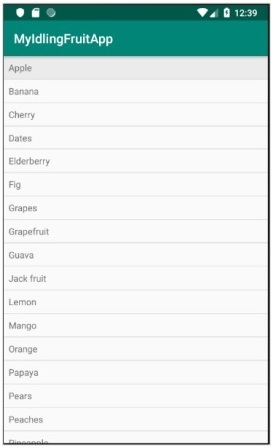
现在,编译上面的代码并运行应用程序。我的闲果App截图如下,
-
现在,打开ExampleInstrumentedTest.java文件并添加如下指定的 ActivityTestRule,
@Rule
public ActivityTestRule<MainActivity> mActivityRule =
   new ActivityTestRule<MainActivity>(MainActivity.class);
Also, make sure the test configuration is done in app/build.gradle
dependencies {
   testImplementation 'junit:junit:4.12'
   androidTestImplementation 'androidx.test:runner:1.1.1'
   androidTestImplementation 'androidx.test:rules:1.1.1'
   androidTestImplementation 'androidx.test.espresso:espresso-core:3.1.1'
   implementation 'androidx.test.espresso:espresso-idling-resource:3.1.1'
   androidTestImplementation "androidx.test.espresso.idling:idlingconcurrent:3.1.1"
}
-
添加一个新的测试用例来测试列表视图,如下所示,
@Before
public void registerIdlingResource() {
   IdlingRegistry.getInstance().register(MyIdlingResource.getIdlingResource());
}
@Test
public void contentTest() {
   // click a child item
   onData(allOf())
   .inAdapterView(withId(R.id.listView))
   .atPosition(10)
   .perform(click());
}
@After
public void unregisterIdlingResource() {
   IdlingRegistry.getInstance().unregister(MyIdlingResource.getIdlingResource());
}
-
最后,使用android studio 的上下文菜单运行测试用例并检查是否所有测试用例都成功。
