XAML – 依赖属性
XAML – 依赖属性
依赖属性是一种特定类型的属性,其值后跟一个敏锐的属性系统,该系统也是 Windows 运行时应用程序的一部分。定义依赖属性的类必须从 DependencyObject 类继承。
XAML 中使用的许多 UI 控件类都派生自 DependencyObject 类并支持依赖项属性。以下 XAML 代码创建一个具有某些属性的按钮。
<Window x:Class = "XAMLDependencyProperty.MainWindow"
   xmlns = "http://schemas.microsoft.com/winfx/2006/xaml/presentation"
   xmlns:x = "http://schemas.microsoft.com/winfx/2006/xaml"
   xmlns:local = "clr-namespace:XAMLDependencyProperty"
   Title = "MainWindow" Height = "350" Width = "604">

   <Grid>
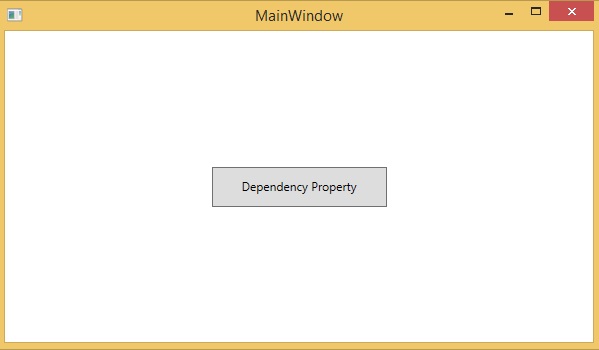
      <Button Height = "40" Width = "175" Margin = "10" Content = "Dependency Property">
         <Button.Style>
            <Style TargetType = "{x:Type Button}">
               <Style.Triggers>
                  <Trigger Property = "IsMouseOver" Value = "True">
                     <Setter Property = "Foreground" Value = "Red" />
                  </Trigger>
               </Style.Triggers>
            </Style>
         </Button.Style>
      </Button>
   </Grid>

</Window>
XAML 中的 x:Type 标记扩展具有与 C# 中的 typeof() 类似的功能。它在指定采用对象类型的属性时使用,例如 <Style TargetType = “{x:Type Button}”>
当你编译并执行上面的代码时,它会产生下面的 MainWindow。当鼠标悬停在按钮上时,它将改变按钮的前景色。当鼠标离开按钮时,它会变回原来的颜色。
依赖属性和其他 CLR 属性之间的主要区别是 –
-
CLR 属性可以通过使用getter和setter直接从类的私有成员读取/写入。在依赖属性的情况下,它不存储在本地对象中。
-
依赖属性存储在由 DependencyObject 类提供的键/值对字典中。
-
它还节省了大量内存,因为它在更改时存储属性。
-
它也可以在 XAML 中绑定。
在 .NET 框架中,还可以定义自定义依赖属性。以下是在 C# 中定义自定义依赖项属性的步骤。
-
使用系统调用寄存器声明并注册您的依赖属性。
-
提供属性的 setter 和 getter。
-
定义一个静态处理程序来处理全局发生的任何更改。
-
定义一个实例处理程序来处理该特定实例发生的任何更改。
下面给出了 C# 中依赖属性的代码,该代码定义为设置用户控件的 SetText 属性。
using System;
using System.Collections.Generic;
using System.Linq;
using System.Text;
using System.Threading.Tasks;

using System.Windows;
using System.Windows.Controls;
using System.Windows.Data;
using System.Windows.Documents;
using System.Windows.Input;
using System.Windows.Media;
using System.Windows.Media.Imaging;
using System.Windows.Navigation;
using System.Windows.Shapes;

namespace WpfApplication3 {
   /// <summary>
      /// Interaction logic for UserControl1.xaml
   /// </summary>

   public partial class UserControl1 : UserControl {
      public UserControl1() {
         InitializeComponent();
      }
      public static readonly DependencyProperty
         SetTextProperty = DependencyProperty.Register("SetText", typeof(string),
         typeof(UserControl1), new PropertyMetadata("",
         new PropertyChangedCallback(OnSetTextChanged)));
      public string SetText {
         get {return(string) GetValue(SetTextProperty); }
         set {SetValue(SetTextProperty, value);}
      }
      private static void OnSetTextChanged(DependencyObject d, DependencyPropertyChangedEventArgs e) {
         UserControl1 UserControl1Control = d as UserControl1;
         UserControl1Control.OnSetTextChanged(e);
      }
      private void OnSetTextChanged(DependencyPropertyChangedEventArgs e) {
         tbTest.Text = e.NewValue.ToString();
      }
   }
}
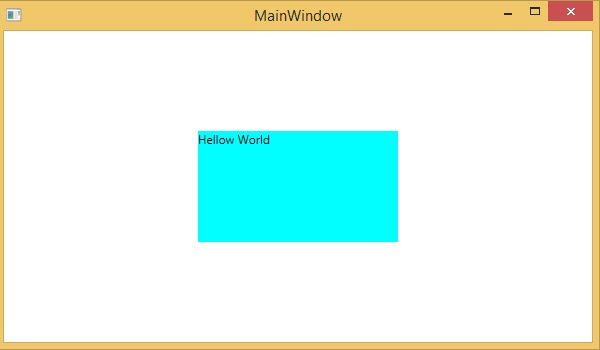
这是 XAML 文件,其中 TextBlock 被定义为用户控件,并且 Text 属性将由 SetText 依赖属性分配给它。
以下 XAML 代码创建一个用户控件,并初始化其 SetText 依赖项属性和一些其他属性。
<Window x:Class = "WpfApplication3.MainWindow"
   xmlns = "http://schemas.microsoft.com/winfx/2006/xaml/presentation"
   xmlns:x = "http://schemas.microsoft.com/winfx/2006/xaml"
   xmlns:views = "clr-namespace:WpfApplication3"
   Title = "MainWindow" Height = "350" Width = "604">

   <Grid>
      <views:UserControl1 SetText = "Hellow World" />
   </Grid>

</Window>
让我们运行这个应用程序,您可以立即在我们的 MainWindow 中看到用户控件的依赖属性已成功用作文本。